Beginner-first: minimum viable setup ordered by impact per dollar, with honest skip guidance.
Best Streaming Gear for Beginners (2026)
The minimal streaming setup that actually works: what to buy first, what to skip, and the order that wastes the least money.
Our top picks at a glance
Buy first
 Logitech StreamCam
Streamers who want a set-and-forget face camera with reliable autofocus and 60 fps motion.
Buy second
 Elgato Green Screen (MT)
Streamers who want clean background removal without mounting anything permanent.
Buy when you grow
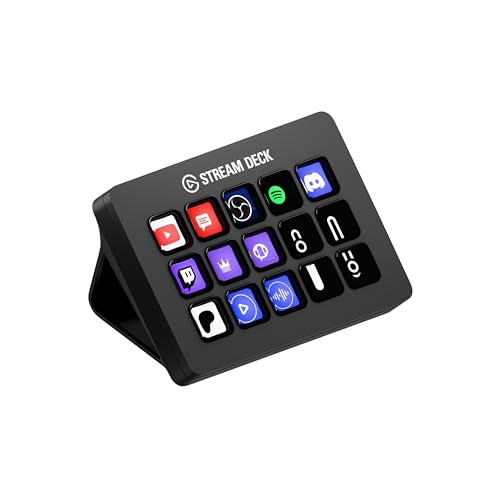 Elgato Stream Deck MK.2
Streamers and creators who switch scenes, trigger alerts, and control audio dozens of times per session.
Beginners should buy in this order: Logitech StreamCam first for a sharp face camera, Elgato Green Screen second for a clean background, and the Stream Deck MK.2 only when scene switching becomes a chore. The HD60 X is day-one essential for console streamers and completely skippable for PC streamers.
The picks, ranked
| Pick | Resolution | Focus | Field of view | Buy |
|---|---|---|---|---|
| Buy firstLogitech StreamCam | 1080p at 60 fps | Autofocus with AI auto-framing | 78 degrees | Check price |
| Buy secondElgato Green Screen (MT) | — | — | — | Check price |
| Buy when you growElgato Stream Deck MK.2 | — | — | — | Check price |
 Only for console streamersElgato HD60 X Only for console streamersElgato HD60 X | — | — | — | Check price |
Buy first
Logitech StreamCam
1080p60 with autofocus that tracks your face.
Strengths
- 1080p60 capture with fast, accurate autofocus
- AI auto-framing keeps you centered as you move
- Dual front-facing microphones for backup audio
Limitations
- 1080p max; no 4K option
- USB-C only, with a fixed non-detachable cable
- Auto-framing can crop tighter than some creators like
What owners report
Commonly praised
- Sharp 1080p at 60fps that looks smooth on stream
- The mount rotates for vertical video
- It is usually plug and play over USB-C
Common complaints
- Autofocus can hunt or react slowly
- Colours and white balance can look off under mixed lighting
- Some owners hit driver or recognition problems, and Mac software support is weaker
Recurring themes from owner reviews on retailers and forums, summarised by our editors. Updated October 2026.
| Resolution | 1080p at 60 fps |
|---|---|
| Focus | Autofocus with AI auto-framing |
| Field of view | 78 degrees |
| Connection | USB-C (fixed 5 ft cable) |
| Mounting | Monitor mount included, tripod thread |
Best for: Streamers who want a set-and-forget face camera with reliable autofocus and 60 fps motion.
Skip if: You want 4K resolution or already own a mirrorless camera with a capture card.
Buy second
Elgato Green Screen (MT)
A wrinkle-free chroma key panel that collapses away.
Strengths
- 148 x 180 cm wrinkle-resistant panel for full-body keying
- Collapses into its aluminum base in seconds
- Dacron fabric resists wrinkles that ruin chroma keys
Limitations
- Still needs decent lighting to key cleanly
- Tall base footprint behind your chair
- Green spill can tint light-colored clothing edges
| Extended size | 148 x 180 cm (58 x 71 in) |
|---|---|
| Material | Wrinkle-resistant Dacron |
| Housing | Aluminum base, auto-locking mechanism |
| Collapsed height | Fits behind a desk or in a closet |
| Weight | 9.3 kg (20.5 lb) per Elgato spec |
Best for: Streamers who want clean background removal without mounting anything permanent.
Skip if: You have a naturally clean background or stream with a blurred virtual background already.
Buy when you grow
Elgato Stream Deck MK.2
15 LCD keys that run your entire stream.
Strengths
- 15 customizable LCD keys with folders and multi-action macros
- Deep plugin ecosystem covering OBS, Twitch, YouTube, Discord, and Spotify
- Removable faceplate and adjustable stand for desk fit
Limitations
- USB connection only; no wireless option on the MK.2
- Software setup takes a real afternoon to do well
- Overkill if you only stream one static scene
What owners report
Commonly praised
- Build quality is solid, and the keys hold up to heavy daily use
- The customisable LCD keys speed up streaming and editing workflows
- A large plugin library covers most apps owners use
Common complaints
- Firmware and software updates can run at startup and delay use
- Some updates have broken profiles or caused icons not to sync
- Support often asks for a ticket before helping, which frustrates some owners
Recurring themes from owner reviews on retailers and forums, summarised by our editors. Updated October 2026.
| Keys | 15 customizable LCD keys |
|---|---|
| Connection | USB 2.0 via USB-C connector |
| Software | Stream Deck app with plugin store |
| Mounting | Detachable stand, adjustable angle |
| Compatibility | Windows 10+ and macOS 11+ |
Best for: Streamers and creators who switch scenes, trigger alerts, and control audio dozens of times per session.
Skip if: You stream casually and rarely touch your scenes mid-broadcast; keyboard shortcuts will cover you.
Only for console streamers
Elgato HD60 X
Console capture with 4K60 HDR passthrough.
Strengths
- 4K60 HDR10 and VRR passthrough to your monitor while capturing
- 1080p60 HDR10 or 4K30 SDR capture over USB 3.0
- Works with PS5, Xbox Series X/S, and Nintendo Switch
Limitations
- External USB design caps capture below passthrough quality
- Needs a USB 3.0 port; USB 2.0 will not carry the signal
- No HDMI 2.1, so no 4K120 passthrough
What owners report
Commonly praised
- 4K60 HDR passthrough with no noticeable lag
- It works as a standard UVC device without installing Elgato software
- Compact and simple to set up with consoles
Common complaints
- Some owners report audio dropouts or audio drifting out of sync
- OBS occasionally stops picking up its audio until reconfigured
- Linux support can be unreliable on some setups
Recurring themes from owner reviews on retailers and forums, summarised by our editors. Updated October 2026.
| Capture | 1080p60 HDR10 / 4K30 SDR |
|---|---|
| Passthrough | 4K60 HDR10, VRR supported |
| Connection | USB 3.0 (USB-C connector), HDMI in/out |
| Latency | Sub-100ms via USB 3.0 (Elgato spec) |
| Compatibility | Windows 10+ and macOS 11+ |
Best for: Console streamers on PS5 or Xbox Series X who want to play in 4K HDR while capturing clean 1080p60.
Skip if: You only stream from a PC; your GPU can capture its own output with no extra hardware.
Questions, answered
How much should a beginner spend on streaming gear?
Start with what fixes your biggest visible problem, usually audio or camera. A functional beginner setup is a decent mic, a decent webcam, and free OBS. Add control and capture hardware when your content demands it.
Is OBS really free and good enough?
Yes. OBS Studio is free, open source, and powers a large share of professional streams. Paid software adds convenience, not capability you cannot get in OBS.
What is the biggest beginner mistake with streaming gear?
Buying control hardware before mastering the basics. A Stream Deck does not fix bad audio, bad lighting, or an unclear niche. Fix the signal first, automate second.