In-depth review
Synology DS423+ Review (2026)
Research-based review of the Synology DS423+: Intel transcoding, NVMe cache slots, RAM expansion, and the 1GbE caveat.

Synology DS423+
Four bays and an Intel chip: the NAS you grow into, not out of.
Our verdict
Verdict: The DS423+ is the most future-proof home NAS in its class: four bays, an Intel chip with Quick Sync, expandable RAM, and NVMe cache slots cover nearly every home workload. The trade-off is networking from a previous era; dual 1GbE with link aggregation is fine, but a premium 2026 NAS without 2.5GbE is a legitimate gripe. Buy it for capability and software, not for raw transfer speed.
What we like
- Intel Celeron J4125 with Quick Sync enables hardware-accelerated Plex transcoding
- Two M.2 NVMe slots let you add SSD cache without sacrificing a drive bay
- RAM expands from 2 GB to 6 GB, and DSM supports Docker and VMs for tinkerers
What to watch out for
- Costs notably more than two-bay rivals before you buy a single drive
- Still limited to 1GbE ports; no 2.5GbE despite the premium positioning
- Synology's verified-drive lists can push buyers toward pricier first-party drives
Who it is for
Home users running Plex, Docker containers, or growing media libraries who want a NAS that lasts five-plus years.
Setup and software
DSM on the DS423+ is the same polished experience as on cheaper units, but with headroom to actually use it: Docker, Virtual Machine Manager, and Surveillance Station all run comfortably on the Celeron J4125 with RAM expanded to 6 GB. Storage Manager handles SHR flexible RAID, letting you mix drive sizes as the array grows.
Performance where it counts
The J4125's Quick Sync engine is the headline: hardware-accelerated H.264 and H.265 transcoding lets Plex serve multiple converted streams while the CPU idles. Two M.2 2280 NVMe slots accept SSD cache that speeds up random I/O for databases and VMs without consuming a drive bay. Sequential transfers saturate the aggregated gigabit links as expected.
What it gets wrong
Networking is the weak point: two 1GbE ports in 2026, when QNAP and TerraMaster ship 2.5GbE at half the price. Link aggregation helps multi-client scenarios but does not speed up a single transfer. Synology's push toward verified drives also narrows third-party drive choices on newer DSM versions.
How it stacks up
Against the QNAP TS-233, the DS423+ wins on bays (4 vs 2), CPU class (Intel vs ARM), and RAM expandability, but loses badly on network speed per dollar. Against the TerraMaster F2-212, it is in a different league for software and capability, at roughly twice the enclosure cost before drives. Buy the DS423+ when workloads matter more than wire speed.
What owners report
Commonly praised
- Polished DSM software with excellent apps
- Reliable, quiet four-bay design
- Strong backup and media features
Common complaints
- Only 1GbE networking without an upgrade
- Expensive
- Earlier drive-compatibility restrictions frustrated owners
Recurring themes from owner reviews on retailers and forums, summarised by our editors. Updated October 2026.
Key specifications
- Drive bays
- 4
- CPU
- Intel Celeron J4125, quad-core (2.0 GHz base, 2.7 GHz burst)
- Memory
- 2 GB DDR4, expandable to 6 GB
- M.2 slots
- 2x 2280 NVMe for SSD cache
- Network
- 2x 1GbE RJ-45 with link aggregation
Also consider
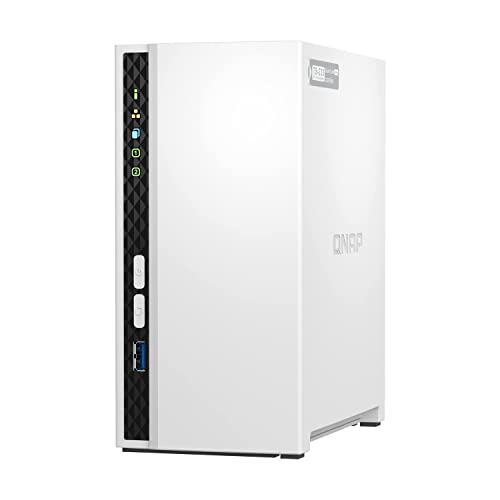
QNAP TS-233
2.5GbE networking at a two-bay price.
- Drive bays: 2
- CPU: ARM Cortex-A55, quad-core 2.0 GHz

Synology DS223j
The simplest credible NAS: DSM software, two bays, zero fuss.
- Drive bays: 2
- CPU: Realtek RTD1619B, quad-core 1.7 GHz
Research-based assessment. ThePickLedger has not hands-on tested this product; this evaluation synthesizes manufacturer specifications, retailer documentation, and published expert reviews.
Questions, answered
Can I expand the RAM on the DS423+?
Yes. It ships with 2 GB of DDR4 and officially supports expansion to 6 GB via its SO-DIMM slot, which noticeably helps Docker and VM workloads.
Does it support SSD caching?
Yes, through two M.2 2280 NVMe slots dedicated to cache. This accelerates random read/write without sacrificing any of the four drive bays.
Is link aggregation a substitute for 2.5GbE?
Only partially. It helps when several clients transfer at once, but a single file copy still tops out at gigabit speed. For single-client speed, 2.5GbE is superior.