Best of
The Best Monitors for 2026
The best monitors for home offices, gaming, creative work, and budgets, researched from manufacturer specs and expert reviews.
Our top picks at a glance
Best for home office
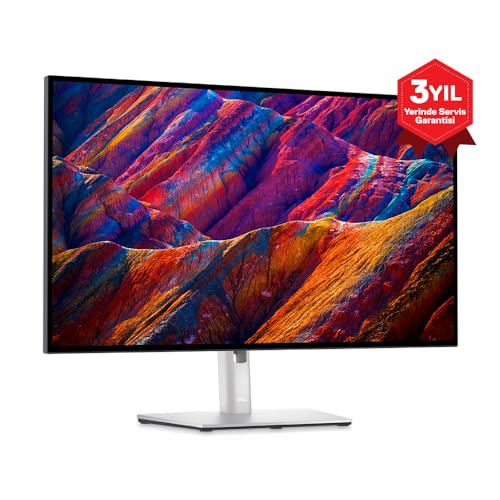 Dell UltraSharp U2723D
Home office workers who want excellent text clarity and one-cable laptop docking.
The Dell UltraSharp U2723D is the best monitor for most home offices thanks to its high-contrast IPS Black panel and single-cable USB-C docking. Gamers should get the LG 27GP850 for its 165Hz Nano IPS panel, creators the BenQ PD2705U for factory-calibrated 4K color, and budget buyers the Acer Nitro VG270 for 165Hz smoothness at a low price.
The picks, ranked
| Pick | Size | Resolution | Panel | Buy |
|---|---|---|---|---|
| Best for home officeDell UltraSharp U2723D | 27 in | 2560 × 1440 (QHD) | IPS Black | Check price |
 Best gamingLG UltraGear 27GP850 Best gamingLG UltraGear 27GP850 | 27 in | 2560 × 1440 (QHD) | Nano IPS | Check price |
 Best for creatorsBenQ PD2705U Best for creatorsBenQ PD2705U | 27 in | 3840 × 2160 (4K) | IPS | Check price |
 Best budgetAcer Nitro VG270 Best budgetAcer Nitro VG270 | 27 in | 1920 × 1080 (FHD) | IPS | Check price |
 Best curved gamingSamsung Odyssey G5 27 Best curved gamingSamsung Odyssey G5 27 | 27 in | 2560 × 1440 (QHD) | VA, 1000R curved | Check price |
 Best value creator monitorASUS ProArt PA278QV Best value creator monitorASUS ProArt PA278QV | 27 in | 2560 × 1440 (QHD) | IPS | Check price |
 Best with KVM switchGigabyte M27Q Best with KVM switchGigabyte M27Q | 27 in | 2560 × 1440 (QHD) | IPS (SS) | Check price |
 Best VA contrast gamingDell S2722DGM Best VA contrast gamingDell S2722DGM | 27 in | 2560 × 1440 (QHD) | VA, 1500R curved | Check price |
 Best budget 4KLG 27UL500-W Best budget 4KLG 27UL500-W | 27 in | 3840 × 2160 (4K) | IPS | Check price |
 Best 144Hz value pickViewSonic VX2758-2KP-MHD Best 144Hz value pickViewSonic VX2758-2KP-MHD | 27 in | 2560 × 1440 (QHD) | IPS | Check price |
Best for home office
Dell UltraSharp U2723D
IPS Black clarity with a full USB-C hub.
Strengths
- IPS Black panel with strong contrast
- USB-C hub with 90W power delivery
- Factory color calibration
Limitations
- 60Hz refresh rate only
- No HDR gaming features
- Premium price for the size
What owners report
Commonly praised
- Sharp 4K text and accurate color for office and Mac setups
- USB-C hub with charging, ethernet, and many ports
- Excellent stand adjustability
Common complaints
- 60Hz only, with no variable refresh for gaming
- Some units show backlight bleed along the edges
- HDR is weak, and reflections are noticeable in bright rooms
Recurring themes from owner reviews on retailers and forums, summarised by our editors. Updated October 2026.
| Size | 27 in |
|---|---|
| Resolution | 2560 × 1440 (QHD) |
| Panel | IPS Black |
| Refresh rate | 60 Hz |
| USB-C | Yes, 90W PD with hub |
Best for: Home office workers who want excellent text clarity and one-cable laptop docking.
Skip if: You need high refresh rates for gaming.
Best gaming
LG UltraGear 27GP850
Fast Nano IPS gaming without the flagship tax.
Strengths
- 165Hz (180Hz OC) refresh rate
- Nano IPS with wide color gamut
- G-Sync and FreeSync Premium support
Limitations
- IPS contrast is average
- HDR is basic
- Stand is bulky
What owners report
Commonly praised
- Fast, smooth 165Hz+ gameplay with low blur
- Vivid Nano IPS colors
- Good value for a high-refresh 1440p monitor
Common complaints
- IPS glow in dark scenes is a common complaint, and it varies unit to unit
- Some buyers exchange units over backlight bleed
- Contrast is limited in dark rooms
Recurring themes from owner reviews on retailers and forums, summarised by our editors. Updated October 2026.
| Size | 27 in |
|---|---|
| Resolution | 2560 × 1440 (QHD) |
| Panel | Nano IPS |
| Refresh rate | 165 Hz (180 Hz OC) |
| Response | 1 ms GtG |
Best for: Gamers who want 165Hz smoothness and good color in one 1440p panel.
Skip if: You do color-critical creative work.
Best for creators
BenQ PD2705U
4K color accuracy for designers.
Strengths
- 4K IPS with strong color accuracy
- USB-C with 65W charging
- Dedicated CAD/CAM and animation modes
Limitations
- 60Hz only
- No local dimming for HDR
- Priced above general-use 4K monitors
What owners report
Commonly praised
- Accurate color for photo and design work
- Single USB-C cable powers and connects laptops
- Hotkey Puck makes switching modes easy
Common complaints
- Brightness is limited for very bright rooms
- Built-in speakers are weak
- Occasional corner light leakage reported
Recurring themes from owner reviews on retailers and forums, summarised by our editors. Updated October 2026.
| Size | 27 in |
|---|---|
| Resolution | 3840 × 2160 (4K) |
| Panel | IPS |
| Refresh rate | 60 Hz |
| USB-C | Yes, 65W PD |
Best for: Designers and video editors who need factory-calibrated 4K color.
Skip if: You mainly game or want high refresh rates.
Best budget
Acer Nitro VG270
Budget 165Hz gaming that gets the basics right.
Strengths
- 165Hz refresh rate at a budget price
- Decent color for the class
- FreeSync support
Limitations
- 1080p on 27 in looks soft
- Basic stand with limited adjustment
- No USB-C
| Size | 27 in |
|---|---|
| Resolution | 1920 × 1080 (FHD) |
| Panel | IPS |
| Refresh rate | 165 Hz |
Best for: Budget gamers who want high refresh rates without spending much.
Skip if: You need accurate color or USB-C docking.
Best curved gaming
Samsung Odyssey G5 27
1000R curved immersion at a mid-range price.
Strengths
- Aggressive 1000R curve fills peripheral vision
- 165Hz with 1ms response
- Strong contrast from the VA panel
- FreeSync Premium support
Limitations
- 1000R curve can distort straight lines for design work
- Viewing angles narrower than IPS
- Stand adjustment is limited
| Size | 27 in |
|---|---|
| Resolution | 2560 × 1440 (QHD) |
| Panel | VA, 1000R curved |
| Refresh rate | 165 Hz |
| Response | 1 ms MPRT |
Best for: Gamers who want a deeply curved 1440p panel that wraps the field of view.
Skip if: You do color-critical work or share the screen with someone beside you.
Best value creator monitor
ASUS ProArt PA278QV
Calibrated creator color without the creator price.
Strengths
- Factory calibrated to Delta E under 2
- 100% sRGB and Rec.709 coverage
- 75Hz is smoother than standard office 60Hz
- Ergonomic stand with portrait pivot
Limitations
- No USB-C input
- 75Hz tops out for gaming
- 1440p limits fine-detail work versus 4K
| Size | 27 in |
|---|---|
| Resolution | 2560 × 1440 (QHD) |
| Panel | IPS |
| Color | 100% sRGB / Rec.709, Delta E < 2 |
| Refresh rate | 75 Hz |
Best for: Photographers and designers who need trustworthy color on a reasonable budget.
Skip if: You need 4K resolution or high refresh rates.
Best with KVM switch
Gigabyte M27Q
170Hz gaming with a built-in KVM switch.
Strengths
- 170Hz overclockable refresh rate
- KVM switch controls two devices with one keyboard and mouse
- USB-C input for laptops
- Wide color gamut IPS panel
Limitations
- BGR subpixel layout can soften text on some systems
- HDR400 is entry-level HDR
- Menu system is clunky
| Size | 27 in |
|---|---|
| Resolution | 2560 × 1440 (QHD) |
| Panel | IPS (SS) |
| Refresh rate | 170 Hz (OC) |
| Extras | KVM switch, USB-C input |
Best for: Gamers and multitaskers who switch one monitor between a PC and a laptop.
Skip if: You want the highest contrast or do professional color work.
Best VA contrast gaming
Dell S2722DGM
VA contrast and 165Hz in a gentle curve.
Strengths
- VA panel with much deeper blacks than IPS
- 165Hz with fast response for the panel type
- 1500R curve adds immersion without distortion
- FreeSync Premium support
Limitations
- Viewing angles narrower than IPS
- No USB-C input
- Some dark-scene smearing typical of VA
| Size | 27 in |
|---|---|
| Resolution | 2560 × 1440 (QHD) |
| Panel | VA, 1500R curved |
| Refresh rate | 165 Hz |
| Response | 1 ms MPRT |
Best for: Gamers who play in dim rooms and want deep blacks without OLED prices.
Skip if: You need wide viewing angles or USB-C docking.
Best budget 4K
LG 27UL500-W
4K IPS sharpness at a mainstream price.
Strengths
- True 4K IPS panel
- 98% sRGB coverage
- HDR10 support
- Slim bezels and clean design
Limitations
- 60Hz only
- No USB-C input
- HDR is basic without local dimming
| Size | 27 in |
|---|---|
| Resolution | 3840 × 2160 (4K) |
| Panel | IPS |
| Color | 98% sRGB |
| Refresh rate | 60 Hz |
Best for: Buyers who want 4K desktop sharpness for documents, media, and light creative work.
Skip if: You need USB-C, high refresh rates, or wide gamut color.
Best 144Hz value pick
ViewSonic VX2758-2KP-MHD
144Hz 1440p gaming for very little money.
Strengths
- 144Hz at 1440p for a budget price
- 1ms response keeps motion clear
- FreeSync support
- Slim profile with VESA mounting
Limitations
- Color accuracy is average out of the box
- Stand has limited adjustment
- No USB-C input
| Size | 27 in |
|---|---|
| Resolution | 2560 × 1440 (QHD) |
| Panel | IPS |
| Refresh rate | 144 Hz |
| Response | 1 ms MPRT |
Best for: Budget gamers who want 1440p resolution and 144Hz in one affordable panel.
Skip if: You need USB-C or accurate factory calibration.
How we chose
Panel type
IPS panels dominate this list for their wide viewing angles and color consistency. Dell's IPS Black variant roughly doubles typical IPS contrast, which matters for text-heavy work in dim rooms.
Resolution
1440p at 27 inches is the sweet spot for sharpness versus GPU and scaling demands. 4K earns its keep for photo and video work where pixel-level detail matters.
Refresh rate
60Hz is fine for office and creative work. Gamers feel the difference at 144Hz and above, and the two gaming picks here run at 165Hz.
USB-C
A single USB-C cable that carries video, data, and laptop charging declutters a desk more than any other feature. Both office-oriented picks include it.
Questions, answered
What size monitor is best for a home office?
27 inches at 1440p is the most recommended combination: large enough for side-by-side windows, sharp enough that text stays crisp, and modest enough in GPU demand that any modern laptop drives it easily.
Is 4K worth it on a 27-inch monitor?
For photo editing, video editing, and design work, yes: 4K shows finer detail and gives more timeline and canvas room. For documents and browsing, 1440p is the better value because text scaling behaves more predictably.
Do I need a high refresh rate if I do not play games?
No. For office work, writing, and creative tasks, 60Hz is perfectly comfortable. High refresh rates mainly benefit fast-motion gaming and feel subtly smoother in general use, but they are not a productivity requirement.
What does USB-C on a monitor actually do?
A USB-C port with DisplayPort Alt Mode carries the video signal, connects the monitor's USB hub, and charges a laptop over one cable. Look for at least 65W of power delivery so the laptop charges while you work.